
SmartOne IPTV Setup
Connect IptvplanPro to SmartOne IPTV
SmartOne IPTV is a TV-focused player that can identify your installation with a MAC address and Smart Key. Link your IptvplanPro subscription through the player’s supported management page, then reload the app on the television.
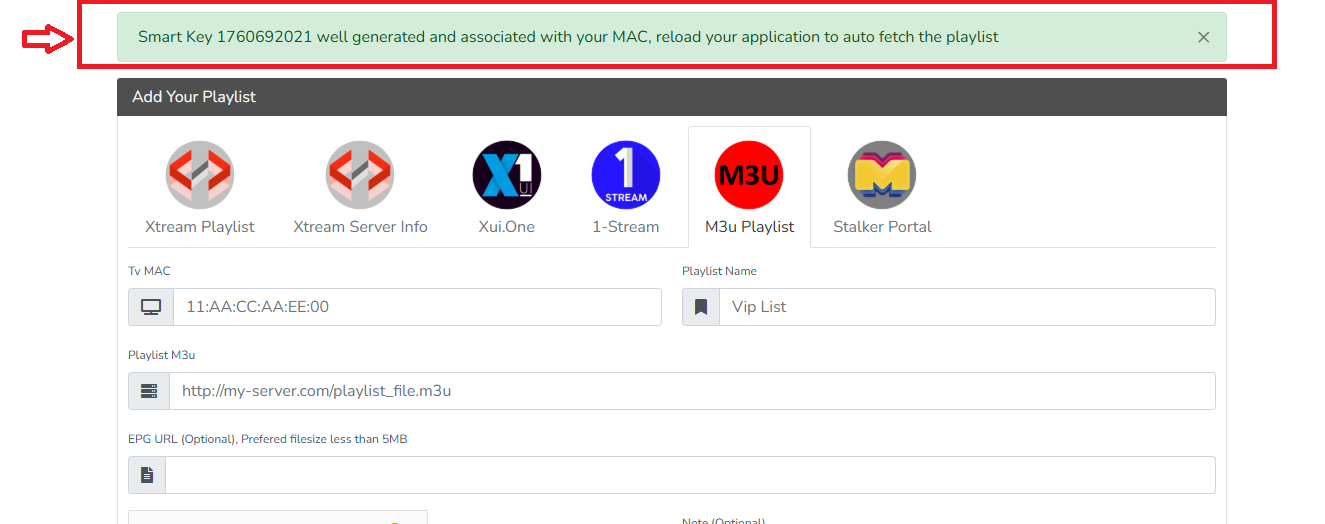
TV identification
The app can show a MAC address and Smart Key used to identify your TV installation.
Playlist or server setup
Use the compatible M3U or server/account method supported by the SmartOne management page.
Reload after saving
Once the subscription is linked, return to the TV and reload SmartOne IPTV.
Step by step
Open SmartOne IPTV on your TV
Find the device information displayed by the app, especially the MAC Address and Smart Key. Keep them private.
Open the supported SmartOne management page
Use a phone or computer, enter the MAC Address and Smart Key shown on the TV, and access the playlist/account management area.
Choose how to add IptvplanPro
If the portal offers M3U, paste the compatible playlist URL supplied after activation. If it offers Server Info/Xtream-style fields, enter the Server URL, Username and Password exactly as provided.
Save the playlist/account
Name it IptvplanPro or another recognizable label, verify the device information and save the changes.
Reload the TV app
Return to SmartOne IPTV and use its reload/restart flow. After synchronization, the available channels, Movies and Series should appear in the app.
Keep the Smart Key private
The MAC address and Smart Key identify your player installation. Share them only when needed for your own setup or with trusted support. They are separate from your IptvplanPro username and password.